
Claiming your profile
You can claim your profile to edit some of the information that is displayed about you in Director Network. Diligent uses publicly available data to create individual profiles.
-
To claim your profile, on the Home screen, select Claim my Profile.
Note
If you are in Boards and not on the Director Network Home screen, select Navigation menu
 and select Director Network.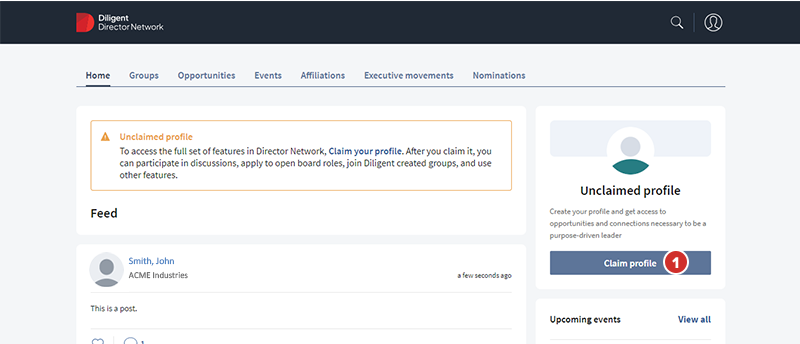
-
Director Network can identify whether an existing Director Network individual profile in the database relates to a user. Director Network suggests a profile for you to claim. If the suggestion is correct, select Claim. If the suggestion is incorrect, proceed to Step 3.
-
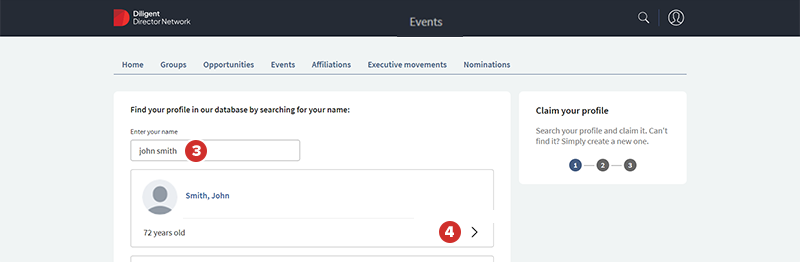
To claim your profile that is existing on the database, but the suggestion in Step 2 is incorrect, select Search our database, and in the Enter your name field, enter your first and last name.
-
If your profile is in the database, select the Arrow icon in the profile tile.
-
Select Claim.
-
In the Email address field, enter your email address in case Diligent needs to contact you about confirming your claim.
-
Select the I acknowledge that I am the person above and I agree to the terms of service and privacy policy checkbox and select Submit.
If Director Network confirms that the profile matches your Diligent account information, you have claimed your account. If Director Network requires more information, it sets your claim status as pending, and Diligent contacts you using the email address that you entered to continue the process.
