Searching for and requesting to join a group
There are two ways for you to become a member of a group:
-
Group administrators can invite members to join. The members can be existing Director Network users or not. In the latter case, there is an onboarding process put in place, where users will be asked to create a new password to access Director Network and ultimately become members of this group.
-
Verified members can also submit a request to join any available group, pending acceptance by the Diligent group administrator. For further information about how to join a group, go to the steps below.
In Director Network, you can search for and request to join a Diligent Network Community Group. Diligent creates Network Community Groups to provide a place for individuals to talk about governance best practices, industry challenges, and emerging issues for the board and executive community.
-
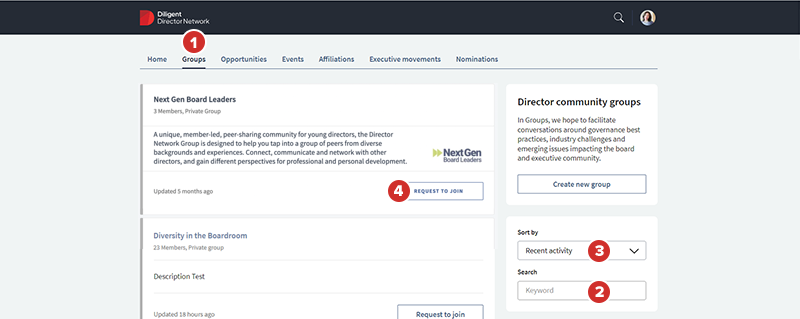
To search for and request to join a group, select the Groups tab.
Note
If you are in Boards and not in Director Network, select Navigation menu
 and select Director Network.
 -
To search for a group, in the Search field, enter a keyword.
-
To organize the results by creation or activity date, in the Sort By dropdown, select Recent activity or Recent creation.
-
To join a group from the results, select Request to Join.
After you select the button, it updates to display Request Pending. After a group administrator approves your request to join the group, your group membership becomes active immediately.