
iPhone app
Projects is an app in Diligent One. You can access Projects data in real-time using Diligent One on your iPhone.
Download and open the app
Diligent One for iOS is available for download from the iTunes App Store™.
When you open Diligent One, the Diligent One instances you have access to display. You can use your finger to select the appropriate instance and project.
Home page
The figure below displays the components on the home page.
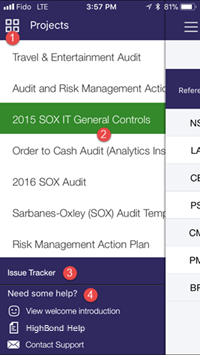
Components
| Number | Component | Description |
|---|---|---|
| 1 | Launchpad toggle |
Provides a list of Diligent One instances you have access to in Launchpad and the option to log out of Diligent One |
| 2 | Active projects list | Provides a list of all active projects in the Diligent One instance |
| 3 | Issue Tracker |
A tool for tracking issues across all projects |
| 4 | Supporting documentation |
Access the introductory guide, Diligent One Help, or contact Support for more information |
Dashboard
The figure below displays the components on the dashboard. The dashboard opens when a project is selected from the active projects list on the home page.
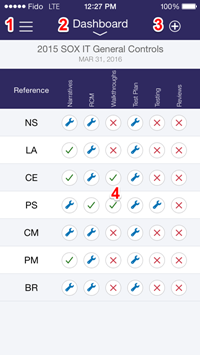
Components
Note
- Interface terms are customizable, and fields and tabs are configurable. In your instance of Diligent One, some terms, fields, and tabs may be different.
- If a required field is left blank, you will see a warning message: This field is required. Some custom fields may have default values.
| Component | Description |
|---|---|
| Home page toggle | Provides a list of active projects available in the Diligent One instance, and access to the Issue Tracker and supporting documentation |
| Project phases and items |
|
| Create options |
Provides options for creating projects and project items |
| Project phases |
Provides an overview of project phases and their associated statuses Tip
You can tap on any project phase to redirect to the appropriate page. |
