
Customizing employee portal invitation emails
Customize the email language in the Employee Portal Invites.
-
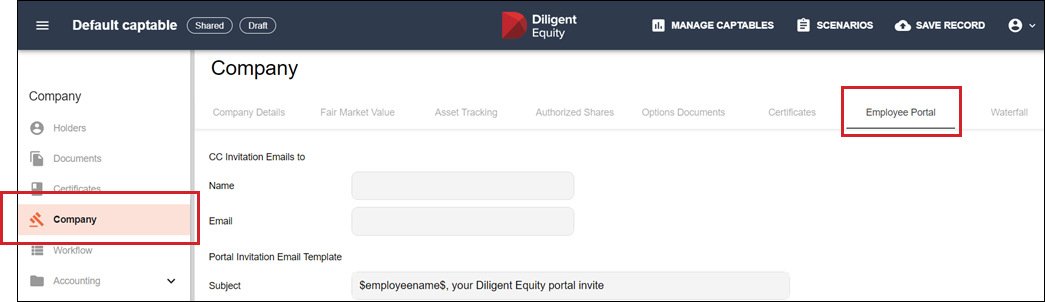
Go to the Company section in the navigation sidebar and select Company > Employee Portal tab.
-
Customize the Portal Invitation Email Template with your own language.
Caution
Do not remove the variables "$inviteCode$" or "$inviteurl$" as these are needed for the registration process.
-
Default Subject Line: $employeename$, your Diligent Equity portal invite
-
Default Email Copy: Dear $employeename$, You have been invited to track your equity in $companyname$ using Diligent Equity. Follow the link below to register your account and use the invite code $inviteCode$ to register. $inviteurl$ $companyname$ via app.equityeffect.com
-
-
Customize the Employee Portal Removal Email Template with your own language.
-
Default Subject Line: $employeename$, Diligent Equity update
-
Default Email Copy: Dear $employeename$, Your access to your equity information in $companyname$ using Diligent Equity has been canceled by $companyname$.
-
-
(Optional). Add an email to include as a CC on all Employee Portal Invites that are sent.
-
Select Save Record and check the Publish to Employee Portal box.
